Cancel Fullscreen
Roles of the Workspace Type
Print

AulaWiki-Tutorial-WorkspaceTypes-Roles

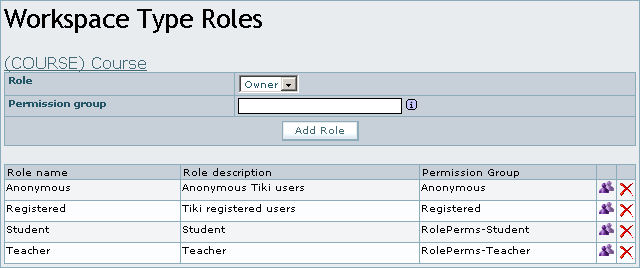
After the course workspace is created, we are able to define the associated roles in the table of existing types below by clicking on the icon .

Roles associated to the type of workspace


In order to associate the roles, we select the name of the role in drop-down menu and indicated a name of group in the text box labelled permission group (optional). If we do not select a group name, the permission group previously used will be associated to the role.

Contributors to this page: alisonruth245 points  , xavi1744 points  and system .
Page last modified on Saturday 23 of September, 2006 22:37:58 CET by alisonruth245 points .